

If you’ve ever tried to design a magazine and had no idea what size to make it, you’re not alone. Most beginners open Canva or InDesign, stare at a blank canvas, and just guess. That one wrong choice can mess up your whole layout, your print cost, and even how readers feel holding it in their hands.
The good news is that magazine dimensions are not complicated once you know the basics. This guide breaks down every standard magazine size, every format, every binding type, and even digital specs, so you never have to guess again.
Standard Magazine Dimensions
Walk into any bookstore and you’ll notice most magazines feel roughly the same size in your hand. That’s not a coincidence. Publishers stick to standard magazine dimensions because printers are built around them, distribution racks are sized for them, and readers are used to them.
Here’s a quick overview of the most common magazine formats used in 2026:
| Magazine Format | Dimensions (inches) | Dimensions (mm) | Common Use |
| Standard Letter | 8.5 x 11 | 216 x 279 | Consumer magazines |
| Digest Size | 5.5 x 8.5 | 140 x 216 | Compact publications |
| Tabloid | 11 x 17 | 279 x 432 | Large-format print |
| Pocket Size | 4 x 6 | 102 x 152 | Travel and mini guides |
| Square Format | 8.5 x 8.5 | 216 x 216 | Art and photography |
| Oversized | 9 x 12 | 229 x 305 | Premium fashion |
Choosing the right magazine page size from the start saves you from expensive reprints and layout nightmares later.
Letter Size Magazine (8.5 x 11 inches)
This is the king of US magazine dimensions. The 8.5 x 11 inch magazine size is what most people picture when they think of a magazine. Time, National Geographic, Cosmopolitan, and hundreds of other titles all use this exact standard magazine format.
Why is it so popular? Because it lines up perfectly with standard printing equipment, fits inside most magazine racks, and gives designers enough space to play with bold images, long articles, and clear ad placements. It’s also the same size as regular office paper, which keeps print setup simple and affordable.
If you’re launching a new publication and you’re not sure which magazine size to pick, start here. Most printers offer their best rates for this format, which keeps your magazine production costs manageable from day one.
Also Read:Aluminum Can Dimensions: Standard Sizes & Diameter (2026)
Digest Size Magazine (5.5 x 8.5 inches)

The digest size magazine is exactly half of the letter size, which makes it smart for printing and easy for readers to carry around. Reader’s Digest made this format famous, and it’s still a solid choice for publications that want a portable, lightweight feel.
Designers working with 5.5 x 8.5 inch magazine dimensions have to work smarter with their layouts. Less space means tighter column grids, smaller images, and more thoughtful typography choices. But the payoff is a magazine that fits in a jacket pocket, a purse, or a backpack without any fuss.
Print costs for digest size run about 20 to 30 percent lower than letter size because you’re using less paper. If your audience is always on the move, the compact magazine format is genuinely worth considering over the default letter size.
Tabloid Size Magazine (11 x 17 inches)
Open up an 11 x 17 inch tabloid magazine and your first reaction is probably “wow, that’s big.” That’s the point. This large-format magazine size is built for visual drama. Architecture, fine art, and high-end photography publications love this format because the pages command attention.
The extra real estate lets art directors go bold with full-bleed spreads, oversized typography, and layouts that would feel cramped on a smaller page. Some newspaper supplements and special-edition prints also use tabloid sizing to stand out on newsstands.
The trade-off is cost and practicality. Tabloid magazine printing costs significantly more per copy, and not every distribution point can handle the size. Use this format when the visual experience is the product, not just a container for articles.
Magazine Binding Types and Their Impact on Dimensions
Here’s something most first-time publishers don’t think about: binding type changes your effective magazine dimensions. The method you use to hold pages together affects spine width, page count limits, handling experience, and total production cost.
Choosing the wrong binding for your page count or format is one of the fastest ways to blow your print budget. Here’s what you need to know about the three main options.
Saddle Stitch Binding
Saddle stitch binding is the most common method you’ll see on magazines. Two or more metal staples go through the fold of the pages to hold everything together. It’s fast, it’s cheap, and it works really well for publications between 8 and 92 pages.
This binding works best with letter size (8.5 x 11) and digest size (5.5 x 8.5) magazines. The pages open relatively flat, which readers appreciate. Most commercial printers offer saddle stitching as their default option, so lead times and costs stay low.
The one real limitation: you cannot print on the spine. For short-run or budget publications, that’s totally fine. For something you want displayed spine-out in a bookstore, you’ll need to look at other options.
Perfect Binding
Perfect binding is what gives a magazine that paperback book feel. Pages are gathered, glued at the spine, and trimmed clean. The result is a flat, professional spine you can actually print your title on.
This magazine binding method requires a minimum of around 48 pages for the spine to be thick enough to be readable. It supports publications up to 240 pages, works best with letter size magazine dimensions, and handles heavier paper stocks well.
Production costs run 50 to 60 percent higher than saddle stitching. But for annual editions, collector issues, or publications that want to sit on a bookshelf for years, the premium look is worth it. Libraries and collectors specifically seek out perfect bound magazines because they hold up better over time.
Wire-O Binding
Wire-O binding uses a double-loop metal wire through punched holes along the spine. Pages can rotate a full 360 degrees and lie completely flat when open. That makes this format the go-to choice for cookbooks, instruction guides, tutorial magazines, and reference publications.
Most wire-O bound magazines stay at 8.5 x 11 inches or smaller. The wire prevents traditional spine printing, so identification has to go on the cover or the edge of pages instead.
Cost is the big downside. Wire-O binding production costs 70 to 80 percent more than saddle stitching. But for recipe magazines, fitness guides, or step-by-step instructional content, readers will notice and appreciate the difference.
Specialized Magazine Sizes and Formats
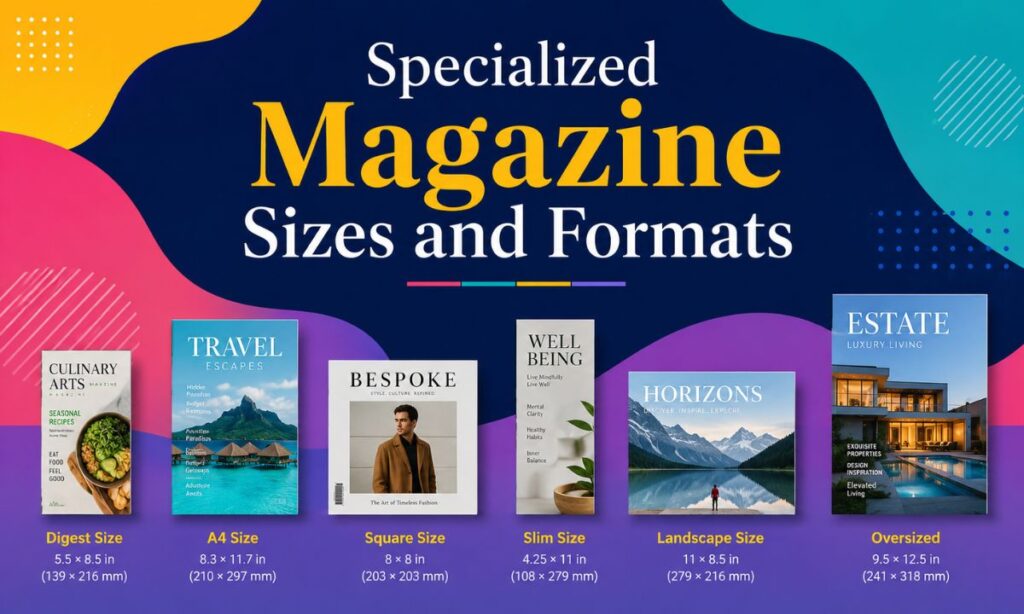
Not every publication fits neatly into the standard boxes. Niche markets, premium brands, and creative publishers sometimes need a custom magazine size that sets them apart on the shelf. Here are the three specialized formats worth knowing.
Pocket Size Magazines (3.5 x 5 inches to 4 x 6 inches)
Pocket size magazines are exactly what they sound like. At 3.5 x 5 to 4 x 6 inches, they slip into any pocket, bag, or glove compartment without a second thought. Travel guides, poetry zines, devotional booklets, and niche hobby publications are the biggest fans of this compact magazine format.
Print costs drop about 30 percent compared to standard letter size, which makes pocket magazines attractive for self-publishers and small-batch creators. The challenge is layout: every element has to be intentional because there’s almost no room for anything extra.
If your content is short-form, list-heavy, or reference-style, the pocket format is genuinely useful. Readers who pick up a pocket magazine expect quick, focused content, not long-form features. Match your content style to the size and this format works really well.
Square Format Magazines (8 x 8 inches or 8.5 x 8.5 inches)
Square magazines at 8 x 8 or 8.5 x 8.5 inches have a distinctive, confident look that stands out immediately on any shelf. Art publications, photography books, design journals, and music magazines are drawn to this format because it treats every page as a canvas.
The symmetrical magazine dimensions let designers create balanced, centered layouts that feel intentional and premium. There’s no natural hierarchy between width and height, which forces more creative decisions about how content flows through the pages.
Production costs run about 15 percent higher than standard letter size because the square format requires custom cutting. But for a brand that lives or dies on visual impact, that extra cost buys real shelf presence. Instagram-driven publications especially love the square format because the cover doubles as a natural social post.
Oversized Magazines (9 x 12 inches and larger)
Oversized magazines start at 9 x 12 inches and can stretch to 12 x 15 inches or even larger for ultra-premium editions. High-end fashion, luxury real estate, fine art, and architecture publications use this format to signal quality before a reader even opens the cover.
The extra page area lets photographers and art directors do things that simply aren’t possible on smaller pages. A portrait hits differently at 9 x 12 than at 8.5 x 11. The format creates an almost gallery-like reading experience that justifies premium cover prices and high advertising rates.
Print costs for oversized magazine dimensions run 50 to 70 percent higher than standard formats. But when positioned correctly in the market, they signal a level of exclusivity that readers and advertisers are willing to pay for.
Digital vs. Print Magazine Dimensions
A lot of publishers today want both: a print edition and a digital version. The problem is that print magazine dimensions and digital magazine dimensions follow completely different rules. Mixing them up is one of the most common and expensive mistakes in modern publishing.
Understanding both systems lets you build a workflow that serves readers on every platform without doing double the work.
Print Magazine Specifications
Every print magazine needs to be set up at 300 DPI for professional-quality output. Anything lower and your images will look soft or pixelated on the printed page. Color mode must be CMYK, not RGB, because printing presses use cyan, magenta, yellow, and black inks, not light.
Bleed areas extend 0.125 inches (3mm) beyond the trim line on all sides. This extra coverage prevents white edges from showing if the cut is even slightly off. Safe zones keep important content at least 0.25 inches away from the trim edge so nothing critical gets clipped.
Paper weight matters too. Interior pages typically use 60 to 100 lb text weight stock. Covers use heavier 80 to 130 lb cover stock for rigidity and a premium feel. Getting the paper spec right is just as important as getting the magazine page dimensions right.
Digital Magazine Dimensions
Digital magazine formats are measured in pixels, not inches. Desktop viewers display best at 1024 x 1366 pixels. Tablet screens, especially high-resolution iPad displays, need 1536 x 2048 pixels for sharp rendering. Smartphone portrait layouts typically run at 1080 x 1920 pixels.
Screen resolution operates at 72 to 150 PPI rather than print’s 300 DPI. Color mode switches to RGB because screens emit light rather than absorbing ink. Interactive elements like embedded videos, clickable links, and animated infographics are also possible in digital formats, which print can never offer.
The smartest publishers today design for responsive digital layouts that reflow automatically across device sizes. A digital magazine that takes 30 seconds to load loses readers before they’ve seen a single page, so file size optimization is critical.
| Format | Resolution | Dimensions | Color Mode |
| 300 DPI | 8.5 x 11 inches | CMYK | |
| Desktop | 72 to 150 PPI | 1024 x 1366 px | RGB |
| Tablet | 150 PPI | 1536 x 2048 px | RGB |
| Mobile | 72 to 150 PPI | 1080 x 1920 px | RGB |
How Magazine Size Affects Design and Reader Experience
Most people think magazine design is just about pretty pictures and good fonts. But the size you choose shapes everything about how a reader interacts with your publication from the moment they pick it up.
A large oversized magazine commands a coffee table. A digest size tucks into a commuter bag. The magazine format sends a signal about the kind of content inside before a single word is read.
Layouts built for letter size magazine dimensions typically use a three or four column grid. Shrink to digest size and you’re working with two columns and tighter image crops. The grid system changes completely with each magazine page size, which means your editorial design decisions are tied directly to the format you choose.
Magazine Size and Production Costs: What to Budget
One of the most practical questions any publisher asks is simple: how much will this cost to print? The answer is directly tied to your magazine dimensions. Here’s a rough cost comparison based on a 1,000-copy print run at 48 pages:
• Standard letter (8.5 x 11): Baseline cost, most affordable per unit
• Digest size (5.5 x 8.5): 20 to 30 percent less than letter size
• Square format (8.5 x 8.5): 15 percent more than letter size
• Oversized (9 x 12): 50 to 70 percent more than letter size
• Tabloid (11 x 17): Significantly higher, varies by printer
Binding adds another layer to the budget. Saddle stitch is the baseline. Perfect binding adds 50 to 60 percent. Wire-O adds 70 to 80 percent. Factor both format and binding into your budget before you finalize your magazine size decision.
Common Magazine Size Questions Answered Fast
What is the standard magazine size in the US?
8.5 x 11 inches. It’s used by the majority of US consumer magazines.
What size is Vogue magazine?
Current US Vogue prints at approximately 8.375 x 10.875 inches, slightly narrower and shorter than standard letter size. This custom trim gives it a distinctive look on newsstands.
What DPI should a magazine be?
Always 300 DPI for print. For digital editions, 72 to 150 PPI depending on target screen resolution.
How do I set up a magazine in InDesign?
Create a new document at your chosen trim size, enable facing pages, add 0.125 inch bleeds on all sides, and set 0.25 inch margins. Match your color mode to your output: CMYK for print, RGB for digital.
Can I use the same file for print and digital?
Not directly. Print files are CMYK at 300 DPI. Digital files are RGB at 72 to 150 PPI. Most publishers maintain two separate export workflows from the same InDesign source file.
Conclusion
Magazine dimensions are one of those things that seem like a small detail until you get them wrong. The wrong size can drive up your print costs, confuse your printer, frustrate your readers, and make your publication look like it doesn’t know what it is.
The standard magazine size of 8.5 x 11 inches exists for good reason: it’s efficient, familiar, and versatile. But depending on your audience, your content type, and your budget, digest size, square format, oversized, or tabloid dimensions might actually serve you better.
Pick your format based on what your readers need and what your content demands, not just what’s cheapest. A well-chosen magazine size is part of your brand identity. Get it right from the start and everything else in your production workflow gets easier from that point forward.